📎 Attachments
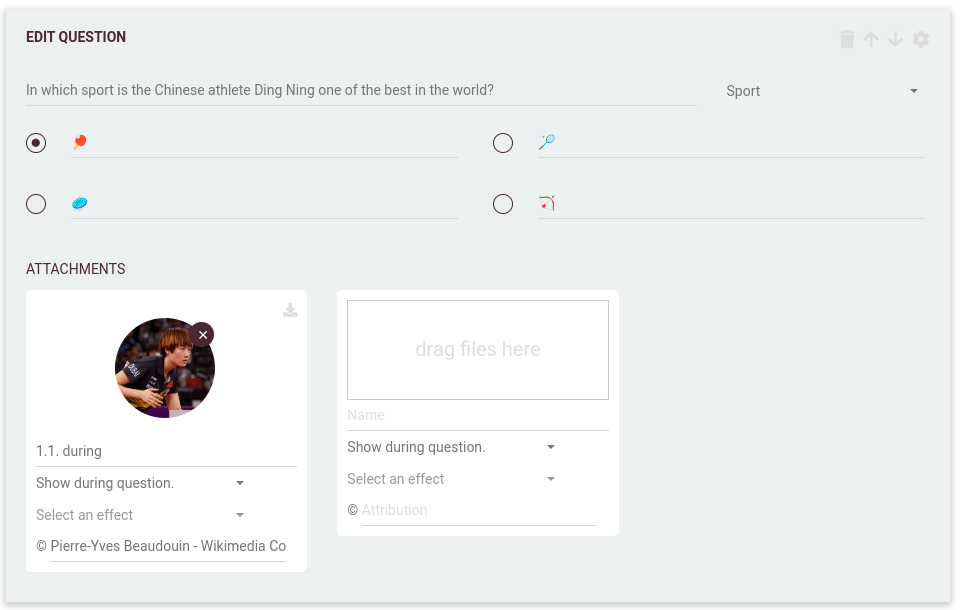
Attachments can be added in various slots throughout your quiz to enrich the experience with images, audio, or video.
These slots appear in the following parts of your quiz:
Each page explains when these attachments are shown during gameplay.
🗂️ Supported file types
Here is a general (non-exhaustive) list of compatible formats:
- Images -
.png,.jpeg,.gif(non-animated). Full HD (1920×1080) recommended - Audio - Most standard formats are supported
- Video - Most standard formats are supported
🔊 ⏱️ Audio and video attachments should be no longer than 15 minutes in duration.
📝 Name & attribution
Each attachment can have a name and optional attribution:
- Name - Displayed to the quizmaster in QuizWitz Live (PRO); helps in organizing attachments
- Attribution - Shown to players as credit or source information. This should be the name of the rights holder.
⚠️ In order to publish a Round-About or Quiz, all attachments must have a valid attribution filled in. Without this, it cannot be made public.
📱 Show on player devices
Images shown between screens - before or after a question, before or after its feedback, and before or after a round - can also be shown on the players' devices, not only on the game screen. Tick Show on player devices on the attachment to do so.
ℹ️ This applies to images only. An image in the During question slot is never mirrored: players see it on the game screen. To make that image fill the game screen instead, use the question's Custom view (see writing questions).
✨ Attachment effects
Some attachment slots support effects to reveal visuals more gradually:
- None - The file is shown as-is
- Spotlight effect - Gradually reveals parts of the image over time with a moving spotlight that expands as it progresses
This is especially effective for puzzles or slow reveals during intros or dramatic moments.
📚 Multiple attachments per slot
Some slots allow adding multiple attachments. The way these behave depends on the game mode:
⚡ In QuizWitz Live (PRO): The quizmaster has full control and can decide when to show or hide attachments during gameplay.
🎮 In games without a quizmaster (Party Game, Conference mode, Single player): All attachments within a slot are shown simultaneously.
Details about each slot’s timing and behavior can be found in the linked documentation for questions, rounds, and quizzes.