🧑⚖️ Jury App - Reviewing open answers in QuizWitz Live
If your quiz includes open answer questions, you'll need to use the Jury App to manually review and score responses.
🗂️ Using the Jury App
The Jury App is a separate interface used by jury members to evaluate answers and manage scoring.
To open the Jury App:
- At the start of the quiz, a Jury Code is generated.
- On a separate device, go to quizwitz.tv
- Enter the Jury Code to access the app
💡 You can open the Jury App on any browser - it's a web app, no installation required.
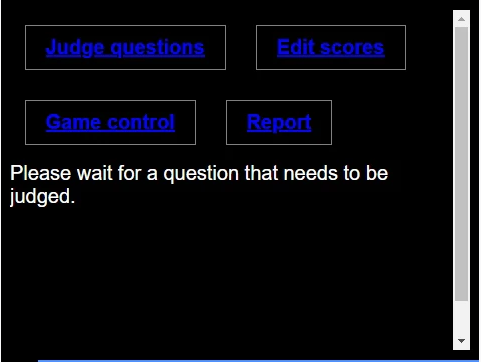
Once inside, the Jury App provides several useful tools:
-
Judge questions - Open question results will appear once a question is completed.
- The game does not wait for the jury to finish - unless it’s the last question of the round or the quiz settings say otherwise.
- Once judged, results appear after the next question.
-
Edit scores - Grant or revoke points manually per player or team.
-
Game control - Adjust question timers or add streaming delays if needed.
For livestream delay setup, see how to host a QuizWitz Live quiz on Twitch
-
Report - Generate a full game report with results and player answers.
✅ Judging open questions
After each open question, the Jury App displays all submitted answers. Jury members must:
- Review each answer carefully
- Tick the checkbox next to each acceptable answer
- Click ‘Confirm’ to lock in the results
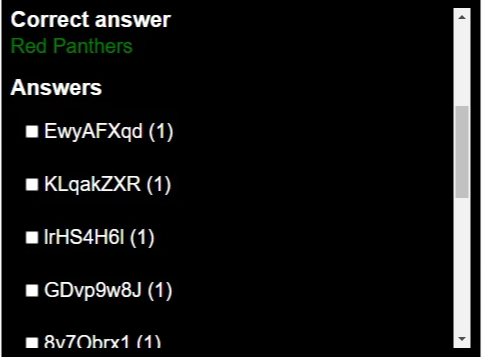
QuizWitz will automatically detect exact matches and mark them as correct. Jury members are responsible for reviewing:
- Partial or alternate answers
- Phonetic matches
- Common spelling variations
🎙️ QuizWitz was designed with phonetic matching in mind - but the final decision is always up to the judges.
With the Jury App, you can fairly assess open responses, adjust scores, and ensure a balanced quiz experience for all players.